Digitrak Datalog Management
DigitTrak Datalog Management (DDM) is a multi-platform service that allows Drilling Contractors to record and visualize their drill jobs. I managed the UX direction of the desktop, mobile and web platforms, all of which need to work seamlessly together.
Drilling contractors in the horizontal drilling industry want to be able to show their clients they finished a job to specifications and on schedule. For years, contractors have been using manual logbooks (DataLogs) to record their jobs. This process was hard to read, maintain, and store. Translating and visualizing the data for their clients is generally difficult and time-consuming. My goal was to find a user-centered solution to this problem.
My Role & Responsibilities
-
Managed the UX direction for the user experience across all systems supported by the product
-
Design and developed the shopping experience for purchasing and managing subscriptions
-
Oversaw user experience of the free and paid features of a mobile application
-
Added features to existing desktop application to improve the user experience without alienating existing users
Research & Results
I interview and observed Drilling Contractors in the field to see how they currently operate. I watched jobs sites from small to large in scale, each of them using a variety of equipment and techniques. Here is some important finding that helped guide the design moving forward:
1
The amount of knowledge needed to operate a drill site is high. We don’t want to add too much to the information load of the contractor than there already is.
2
Visualizing data is so much trouble that most drillers will not do it unless they are mandated to do so.
3
Contactors have zero patience for things that don’t work. If it won’t get the job done, they will find something else.
The Website
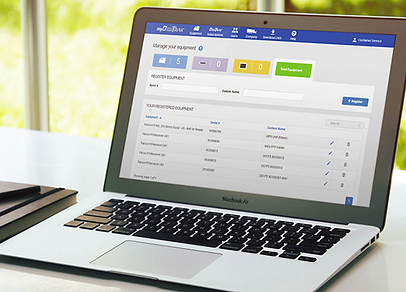
I designed and developed the MyDigiTrak website, a portal to the DigiTrak Datalog Eco-System. Contractors could signup for subscription, manage equipment, and their partners in an intuitive way. A subscription of the service provides access to mobile, web, and desktop apps that integrated in to cloud storage. Contactors should purchase directly on the site or inside an equipment dealership, like they are used to with most drilling products.

The Mobile App
I managed the team creating the LWD (Log While Drilling) Mobile, a mobile app available for Android and iOS. The app allowed contractors to get their data from their locator, visualize data, and share it with clients. Data could be viewed at any point during a drill job’s progress. The data could be visualized in a graph or table format. If GPS data is available, the job can also be placed on a map. Most importantly the entire suite of information can be condensed to an easily readable view by the client.


Outcome
DigiTrak DataLog Management was the first product to market of its kind and received incredibly good positive feedback from the industry. The metrics we collected were highly valuable after release and allowed the team to make continuous improvements to the service. Getting feedback from the users early and often helped to build a roadmap moving forward for future improvements.
Design and Iteration
Feedback was collected from customers early and often. Usability testing was done starting from lo-fidelity to hi-fidelity protypes. Metrics were also gathered using Google Analytics and custom data collection of DataLog data. The data collected helped to solve usability issues before being released to the public. For example, too many steps in the shopping experience or buying a subscription at a dealership caused customers to drop out of the process. Focusing on minimalistic design greatly improved this experience.
Gathering metrics on the user of the product helped guide the company’s plan for future products to support the most common types of drilling. Also, it helped to know what features may need more enhancements.